
Why Rank Trackers Disagree, and How to Track Rankings Accurately
Your rank tracker says 4, Search Console says 9 and a manual search shows something else. Why every number can be right, and a simple setup that gives you rankings you can trust.
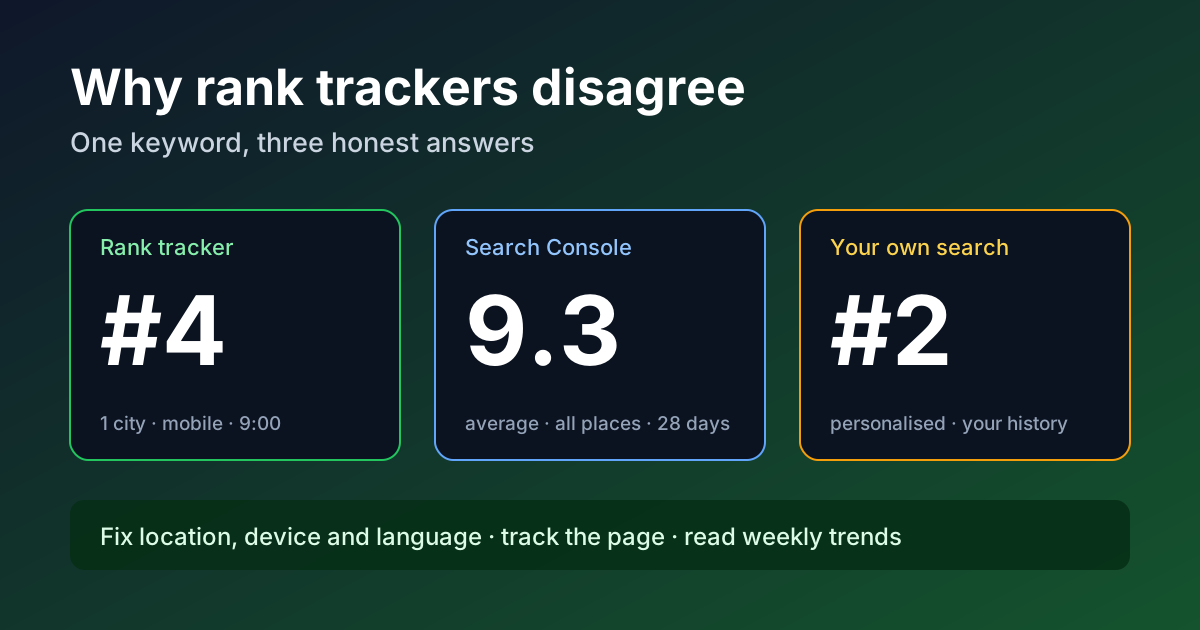
Almost everyone who tracks keyword rankings hits the same moment. The rank tracker says a page is in position 4. Google Search Console says the average position is 9.3. A quick search on your own phone shows the page somewhere near the bottom of the first page. A client asks which number is real, and the honest answer is: all three, measured in different ways.
Accurate rank tracking is not about finding a tool that shows the one true position. There is no single position any more. Google results change with location, device, language, search history and the features shown above the normal links. Accuracy comes from knowing what each number measures and keeping your own measurement consistent. This guide explains where the differences come from and gives you a setup you can trust for decisions.
Quick answer
Rank trackers record one result page, fetched from one location on one device at one moment. Search Console averages the topmost position your site held across real impressions, from every location and device, over the date range you pick. A manual search shows a page shaped by your own location and history. To track accurately, fix the location, device and language in your tracker, track the exact page you want to rank, read trends over weeks rather than daily moves, and use Search Console as the reality check for traffic.
Why the numbers disagree
1. Location is part of the result
Google tailors results to where the searcher is. For anything with local intent, such as "accountant", "web design agency" or "AC repair", the results in one city can look nothing like the results 30 kilometres away. Even queries that do not look local can shift between countries and regions. A tracker set to "India" and a searcher in Kochi are often looking at different pages. If you sell locally, track the cities your customers are in, not just the country. Our local SEO guide for small businesses covers why the map pack behaves so differently from the normal results.
2. Mobile and desktop are separate rankings
Mobile and desktop results are laid out differently, show different features and sometimes rank pages differently. Most traffic for most small sites now comes from mobile, yet plenty of tracker projects are still set to desktop by default. Check which device your tracker uses and match it to where your visitors actually come from in the Devices view of Search Console.
3. What counts as "position 1" is not standard
Some tools count only the ordinary blue links. Others count every block on the page, so a featured snippet, a "People also ask" box, a video carousel or an AI Overview can push your number down even though nothing about your ranking changed. Search Console has its own rules: Google describes position as a relative ranking where 1 is the topmost element, and a block such as a carousel occupies one position as a whole. Before comparing two tools, find out how each one counts. Our guide to SERP features explains the blocks that most often cause the confusion.
4. Search Console reports an average, not a snapshot
This is the biggest source of disagreement. Search Console takes the highest position your site held each time it was shown, then averages that across all impressions in the period. If a page ranks 3 for searchers in Mumbai, 12 in Delhi and 6 on desktop, the average lands somewhere in between and matches none of them. Long-tail variations add to the mix: a page can rank 2 for a precise phrase that gets few searches and 18 for the broad term, and both feed the same figure when you look at the page rather than a single query.
Average position also moves when who sees you changes, even if your ranking does not. Start appearing on page two for a new set of queries and your average gets worse while your traffic grows. Our Search Console tips show how to filter by query, country and device so the average means something.
5. Your own searches are personalised
Signed-in searches, your past clicks, your browser language and your exact location all shape what you see. People who check their own site often see it higher, because they have visited it many times. A private window is fine as a rough check, never as the measurement.
6. Results change during the day
Google tests and updates results constantly, and different data centres can return slightly different pages at the same moment. A one-place drop in the morning that is gone by evening is usually noise. That is why daily rank charts look jumpy and weekly trends are more useful.
7. Tool data collection changed in 2025
In September 2025, Google stopped supporting the URL parameter that many tools used to load 100 results on a single page. Rank trackers had to change how they collect deeper positions, and many site owners saw desktop impressions fall and average position "improve" in Search Console at the same time, without any real change in visibility. If you compare reports across that period, treat the jump as a measurement change, not an SEO win or loss.
A setup for rankings you can trust
| Setting | What to choose | Why it matters |
|---|---|---|
| Location | The city or region where your buyers are | Local and regional results differ a lot |
| Device | Mobile first, desktop as a second project if it matters | Separate layouts and rankings |
| Language | The language your audience searches in | Changes which pages qualify |
| Target URL | The one page you want to rank for each keyword | Shows when Google prefers a different page |
| Frequency | Daily collection, weekly reading | Daily moves are mostly noise |
| Keyword set | A fixed core list, changed rarely | Changing the list changes the averages |
Track the page, not just the domain
For each keyword, decide which page should rank. If your tracker shows a different page from your site ranking instead, you have a cannibalisation or relevance problem to fix, even if the position looks fine. This single check catches more real issues than the position number does. Strong internal linking to the intended page is often the fix.
Group keywords by intent
Do not average "buy" keywords with "what is" keywords. Group them into sets that map to a business goal, such as service pages, product pages and guides. A drop in the informational group matters less than a drop in the set that brings enquiries.
Check against Search Console every month
Once a month, compare your tracked keywords with the Queries report for the same pages. Look for three things: tracked keywords that get almost no impressions (drop or replace them), queries that bring clicks but are not tracked (add the important ones), and pages where clicks fell while tracked positions held (check for new SERP features taking the clicks).
Write down what changed on the site
Keep a simple log: title rewrites, content updates, migrations, new internal links, technical fixes. When a ranking moves, the log tells you whether you caused it or Google did. Without it, people tend to credit or blame the most recent change. When a tracked page drops, run it through our HTTP headers checker first to confirm it still returns a clean 200 and has not picked up a redirect or a noindex header by mistake.
How to read rank changes without overreacting
- Moves of one to three places: usually noise, especially below position 10. Watch the weekly trend.
- A sudden fall of 10 or more places across many keywords: check indexing, robots rules, redirects and server errors first, then look for a confirmed Google update.
- One page falls while others hold: look at what now ranks above you. Often a competitor answered the question more completely, or a new SERP feature arrived.
- Position holds but clicks fall: the page has probably lost space to an AI Overview, ads or other features. A clearer title and snippet can win some of it back.
Our status codes and redirects checklist is the quickest way to rule out technical causes before you rewrite content.
Choosing a rank tracker
Accuracy depends more on settings than on brand. The features that matter most are city-level locations, separate mobile and desktop tracking, landing-page tracking, SERP feature detection and clean exports. Our rank tracking tools comparison walks through the main options. If you only follow a few dozen keywords, Search Console filtered by query, country and device may be enough on its own.
Reporting rankings to clients or a manager
Ranking reports lose trust when numbers jump around without explanation. State the tracking location and device at the top of every report, show weekly or monthly trends rather than single days, and put clicks and enquiries next to rankings so the conversation stays on results. Our SEO reporting templates include a layout for this.
FAQ
Which ranking number should I believe?
Use your rank tracker, with a fixed location and device, for trends on specific keywords. Use Search Console for what real searchers saw and clicked. Use manual searches only as a quick sanity check.
Why is my Search Console average position worse than my tracker?
Because it includes every location, device and long-tail variation where you appeared, including places where you rank lower. A tracker checks the one setting you chose.
How often should I check rankings?
Let the tool collect daily, but review weekly. Reacting to daily changes leads to unnecessary edits.
Can I track rankings accurately for free?
For a small site, yes. Search Console filtered by query, page, country and device gives reliable real-world data. A paid tracker becomes useful when you need city-level tracking, competitor positions or a large keyword list.
Why does my site rank higher when I search myself?
Your search history, location and visits to your own site influence what you see. Other searchers rarely see the same page.
Sources
- Google Search Console Help, What are impressions, position, and clicks?, checked 16 October 2026.
- Google Search Central, Visual elements gallery of Google Search.
Related SEO guides
Robots.txt for SEO: What to Block and What Never to Block
What robots.txt really controls, the rules Google follows, five mistakes that quietly hurt rankings, and a safe starter file for small sites.
Meta Tags for SEO: Which Ones Google Uses and Which to Skip
Which meta tags Google actually reads, which ones only matter for social sharing, and which you can safely delete, with a 10-minute audit.
Keyword Density: How to Check for Keyword Stuffing
There is no perfect keyword density. Learn what Google says about keyword stuffing, how to read a density report, and how to fix repetitive copy before you publish.