
Meta Tags for SEO: Which Ones Google Uses and Which to Skip
Which meta tags Google actually reads, which ones only matter for social sharing, and which you can safely delete, with a 10-minute audit.
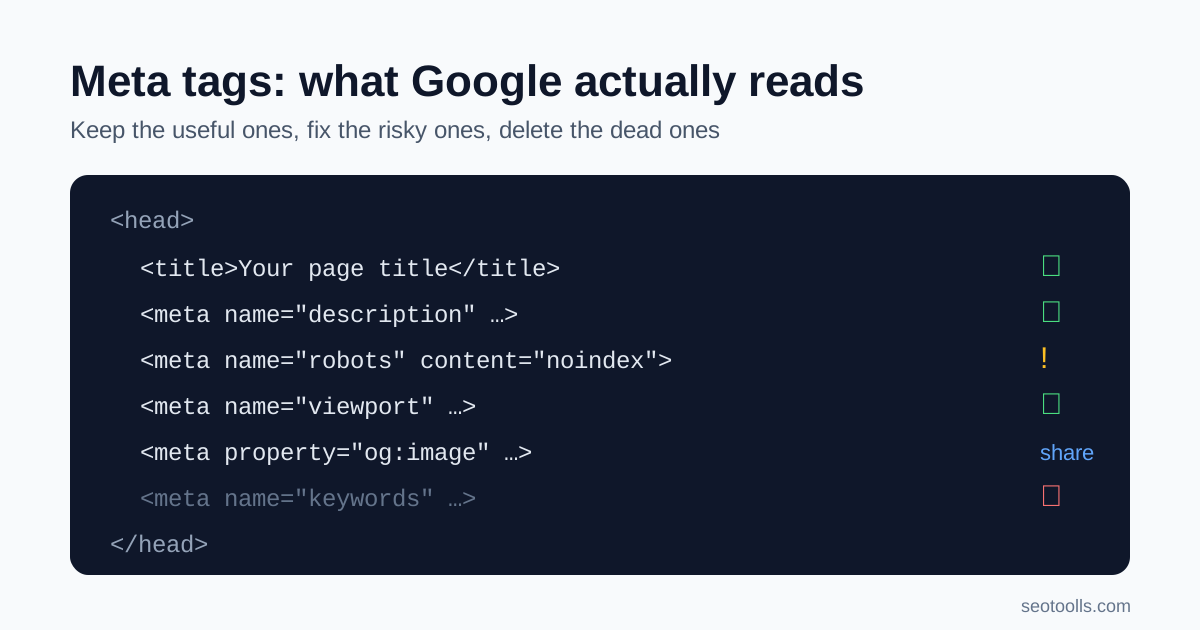
Open the source of almost any website and you will find a pile of meta tags in the head: some written by a developer years ago, some added by plugins, and some copied from a template nobody remembers choosing. A few of them shape how your page appears in Google. Others do nothing at all for search.
This guide sorts them into three groups: tags Google actually uses, tags that matter for social sharing and browsers rather than rankings, and tags you can safely delete. It is based on Google's own list of supported meta tags, checked on 14 October 2026.
Quick answer
For search, focus on four things: a unique, descriptive <title>, a useful meta description, a correct robots meta tag only where you need to restrict indexing, and a viewport tag so the page works on phones. Add a canonical link where duplicates exist and Open Graph tags so shared links look right. The meta keywords tag has no effect on Google Search, so do not spend time on it.
Tags Google uses
The title element
Strictly speaking, <title> is an HTML element rather than a meta tag, but it is the most important item in the head. Google uses it, along with other signals on the page, to build the title link shown in search results. Write one per page that says what the page is about, puts the distinctive words first, and is not repeated across your site.
Length is a practical concern rather than a rule. Long titles get cut off in results, so most SEO tools, including ours, suggest staying around 60 characters.
Meta description
<meta name="description"> is a short summary of the page. Google says it may use this description for the snippet in search results in some situations; at other times it builds the snippet from the page text that best matches the search. A good description still earns its place: when it is used, it is your pitch for the click.
Write a unique description for every important page. Summarise what the reader will get, include the details that matter (price, location, format, who it is for) and avoid stuffing it with keywords.
Robots and googlebot
<meta name="robots"> controls whether a page can be indexed and how it can appear in results. Google is clear that the default values are index, follow and do not need to be specified. In other words, you only need a robots meta tag when you want to restrict something, such as noindex on a thank-you page or internal search results.
If conflicting rules appear, Google applies the more restrictive one. That is why a forgotten noindex left over from a staging site is one of the most damaging meta tag mistakes. For non-HTML files such as PDFs, the same rules can be sent as an X-Robots-Tag HTTP header, which you can confirm with our HTTP headers checker.
Viewport
<meta name="viewport"> tells browsers how to render the page on mobile devices. Google notes that the presence of this tag indicates the page is mobile friendly. Most modern themes include it; check it is there and that it does not disable zooming.
Charset
The charset declaration tells the browser which character encoding the page uses. Google recommends UTF-8 where possible. Get it wrong and characters such as currency symbols, accented letters or non-Latin scripts can display as garbage.
Other supported tags
Google also supports a few special-purpose tags: google-site-verification for Search Console ownership, notranslate to stop translated results, nopagereadaloud to opt out of text-to-speech, and rating to label adult content for SafeSearch. Use them only if the situation applies to you.
Tags that matter outside Google Search
Canonical link
<link rel="canonical"> is a link element, not a meta tag, but it lives in the same place and is often audited alongside them. It tells search engines which URL you prefer when the same content is reachable at several addresses, for example with tracking parameters or both trailing-slash versions. Google treats it as a strong hint rather than a command, so keep it consistent with your internal links and sitemap.
Open Graph and Twitter Card tags
Tags such as og:title, og:description, og:image and twitter:card control how your link looks when shared on social networks and in many messaging apps. They are not in Google's list of supported search meta tags, but a missing or broken share image makes your link look unfinished wherever people paste it. A 1200 by 630 pixel image is a widely used size.
Tags you can delete
- Meta keywords. Google states that the meta keywords tag is not used by Google Search and has no effect on indexing or ranking. It also hands competitors a tidy list of the terms you are targeting.
- Meta refresh used as a redirect. Google recommends a server-side 301 redirect instead, because meta refresh is not supported by all browsers and confuses users.
- rel="next" and rel="prev". Google no longer uses these for indexing. They are harmless, but not worth maintaining for Google's sake.
- Leftover tags from old plugins or tools, such as generator tags revealing old software versions. Google ignores meta tags it does not support, so remove anything that no longer has a purpose.
One more myth: the HTML lang attribute is useful for accessibility and browsers, but Google says it detects page language from the visible text, not from that attribute.
How to audit your meta tags in 10 minutes
- Pick five pages: the home page, a top service or product page, a blog post, a category page and your contact page.
- Run each URL through the Meta Tags Analyzer. It fetches the page and reads the title, meta description, keywords, robots, viewport, charset, canonical, Open Graph and Twitter Card tags.
- Read the issues list, not just the score. The score adds points for each tag present and for titles between 30 and 60 characters and descriptions between 120 and 160 characters. It is a completeness check, not a ranking prediction.
- Use judgement on robots. The analyzer recommends adding a robots tag if none exists. If you want the page indexed, a missing tag is fine, because
index, followis the default. What matters is that no important page carriesnoindex. - Fix duplicates first. Identical titles or descriptions across many pages are a bigger problem than a description that is a few characters short.
- Generate clean markup for any page that needs new tags with the Meta Tag Generator, then confirm the live result in Search Console's URL Inspection tool.
For the wider page checks that sit around meta tags, such as headings, internal links and content quality, see our on-page SEO checklist and the indexable page QA checklist.
Common mistakes
- Injecting meta tags with JavaScript. Google advises avoiding JavaScript to inject or change meta tags where possible, and testing thoroughly if you must. A robots tag that only appears after scripts run is especially risky.
- Invalid head markup. Google needs a valid head section to read tags reliably. An unclosed tag or a stray element high in the head can hide everything below it.
- Same description everywhere. A site-wide default description is worse than none, because it gives every page the same pitch.
- Writing for a keyword count. Titles and descriptions packed with repeated phrases read badly and look spammy. Our guide to keyword stuffing explains how to spot this.
Frequently asked questions
Do meta tags still matter for SEO?
Some do. The title element, meta description, robots and viewport tags all affect how Google crawls, indexes or presents your pages. Others, such as meta keywords, are ignored by Google.
Does Google use the meta keywords tag?
No. Google states that it is not used by Google Search and has no effect on indexing or ranking.
Why does Google show a different description from mine?
Google may build the snippet from page text when it better matches the search. A clear, specific meta description makes it more likely yours is used, but there is no guarantee.
Do I need a robots meta tag on every page?
No. The default is index, follow. Add a robots tag only to pages you want to keep out of results or restrict in other ways.
What is a good score in the Meta Tags Analyzer?
The tool treats 80 and above as excellent and below 60 as needing work. Use the score to find missing tags, then judge each recommendation against what the page actually needs.
Sources
- Google Search Central, Meta tags and attributes that Google supports, checked 14 October 2026.
- Google Search Central, Control your snippets in search results.
- Google Search Central, Influencing your title links in search results.
Related SEO guides
HTTP Status Codes for SEO: Redirect and Error Checklist
Learn how Google treats 200, 301, 302, 404, 410, 429 and 5xx responses, then fix redirect chains, soft 404s and sitemap errors on a small site.
Indexable Page QA Checklist for Small Websites
Check crawl access, robots rules, canonicals, metadata, internal links, content value, mobile rendering, and conversion paths before publishing a page.
JavaScript SEO Renderability Checklist for Small Sites
Check whether Google can render your JavaScript pages: crawlable HTML, lazy loading, links, metadata, canonicals, screenshots, and Seo Tools fix priorities.